
Product Attributes Management
Keep your catalog clean, consistent, and ready to scale. Mercur’s Product Attributes Management gives you a single, governed schema for all attributes - global and category-specific - so you can control what’s required, what powers filters, and how vendors fill in product data.
How do you manage product attributes in Mercur
Define, govern, and reuse product attributes across your entire catalog - so vendors, merchandisers, and storefronts all speak the same language.
With the Product Attributes module, you can:
- Centralize all product attributes in a single admin view - fully searchable and easy to govern.
- Define global and category-specific attributes, so each product type has the right specs (and only those).
- Mark attributes as filterable, so you have full control over which fields turn into storefront filters.
- Mark attributes as required, ensuring vendors and internal teams cannot publish incomplete listings.
- Use rich attribute types (single select, multi select, unit, toggle, text) to match your real-world data.
- Manage possible values and their order to keep filters and dropdowns clean, intuitive, and consistent.
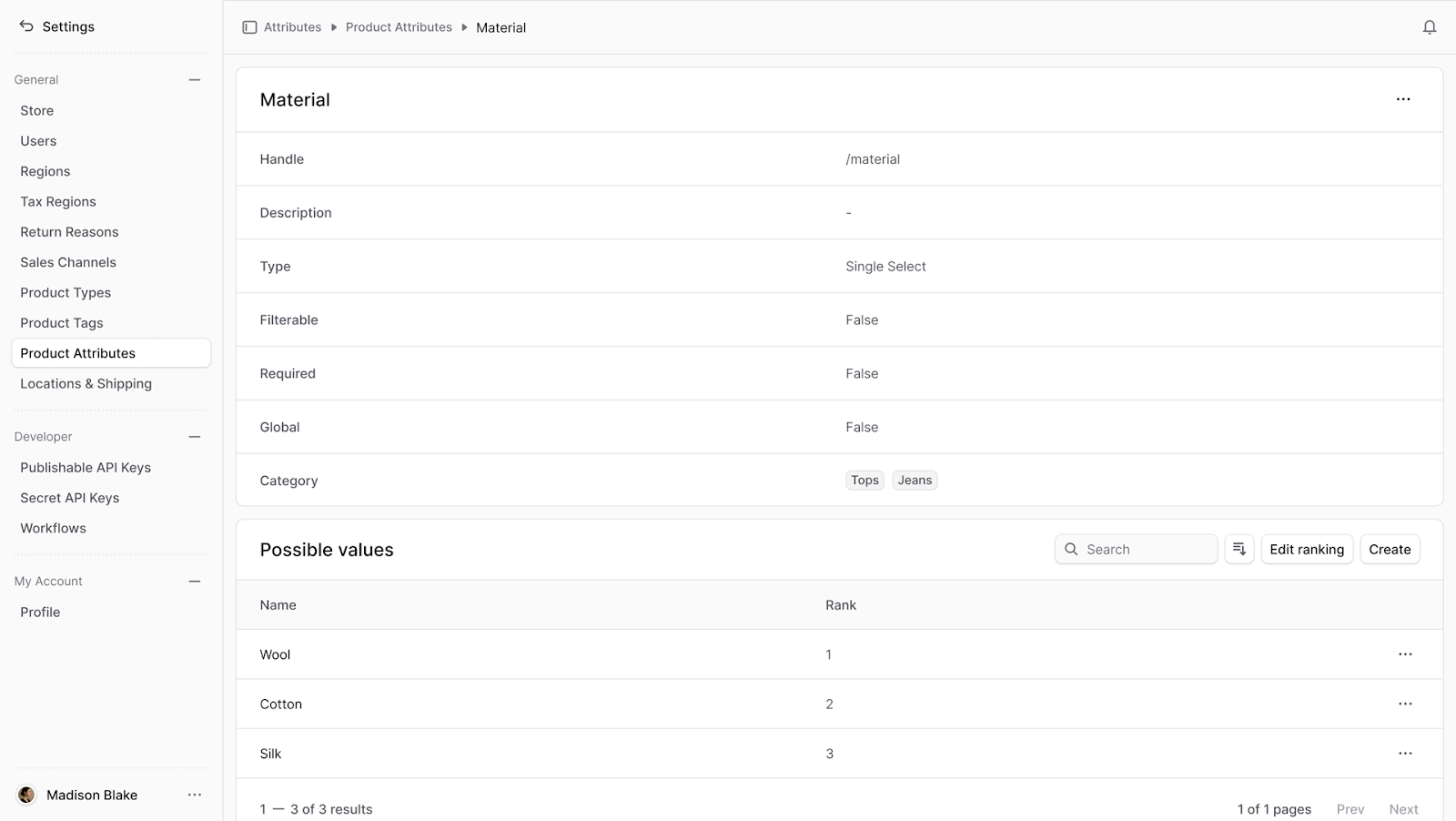
Product Attributes Management
video overview

Build custom marketplace with Mercur
Create your unique multi-vendor platform with our powerful, flexible marketplace solution that adapts to your business needs.
Core capabilities
1. Central attribute schema & governance
Define your entire attribute schema centrally:
- A single list of all attributes used across your catalog.
- Clear names and handles, so business and tech teams know they’re talking about the same thing.
- High-level flags (filterable, required, global/category-specific) available at a glance.
Your catalog, search, and filters all inherit from this schema – so changes are deliberate, controlled, and documented.
2. Global vs category-specific attributes
Not every attribute applies everywhere - and that’s a feature, not a bug.
- Create global attributes that apply to all products (e.g., Brand, Condition).
- Create category-specific attributes for precise use cases (e.g., Screen Size for TVs, Material & Fit for apparel).
- Assign attributes only to the categories where they make sense, so product forms stay focused and clean.
Keep vendor and merchandiser forms lean, avoid confusion, and ensure every category has the specs it truly needs.
3. Filterable & required attributes
Two simple flags control how your attributes behave:
- Filterable - decides if an attribute becomes a filter on the storefront (e.g., Color, Size, Energy Class).
- Required - decides if the attribute must be filled in before a product can be published.
This gives you:
- Better UX on the storefront (filters that always have real values, not empty buckets).
- Higher data quality (no more published products without size, material, or key specs).
- Less manual policing by the catalog team - the system enforces the rules for you.
4. Rich attribute types that match real data
Support multiple attribute types so you can model reality accurately:
- Single Select - one value from a predefined list (e.g., Gender, Condition, Season).
- Multi Select - multiple values (e.g., Waterproof, Breathable, Insulated).
- Unit - numeric values with units (e.g., Weight, Volume, Screen Size).
- Toggle - yes/no flags (e.g., Waterproof, Organic, In stock online).
- Text - free text when you genuinely need flexibility (e.g., Care instructions, Internal notes).
You decide which type is right for each attribute - Mercur enforces consistency on the data your teams and vendors enter.
5. Managing possible values & ranking
For attributes with predefined options, you can fully control:
- Which values are available (e.g., the list of available sizes, colors, or energy classes).
- In what order they appear (e.g., XS, S, M, L, XL instead of alphabetical chaos).
- Which values are active or deprecated over time.
This ranking flows through to storefront filters and dropdowns, so customers see clean, intuitive options that match how they think and shop.
6. Vendor-friendly, operator-controlled
Mercur strikes the balance between operator control and vendor usability:
- Vendors only see the attributes that are relevant for the categories they sell in.
- Required attributes are clearly marked, so they know exactly what they must fill in.
- Predefined values prevent typos, synonyms, and “creative” labeling.
For your team, that means:
- Fewer support tickets about “which fields do I need to fill?”
- Less manual clean-up of messy attribute data.
- Higher listing quality from day one.
7. Full lifecycle in one place
From creation to deletion, everything happens in a single, coherent admin experience:
- Create new attributes in a two-step flow (details → type & values).
- Edit attributes in a side panel without leaving the main context.
- Manage possible values and their order on the same page.
- Safely delete attributes when they’re no longer needed (with clear warnings).
No more hunting through multiple settings pages or asking developers to add “just one more field”.

Build custom marketplace with Mercur
Schedule a guided tour of Mercur Marketplace tailored to your specific marketplace requirements. Connect with our team to discuss how we can help bring your marketplace vision to life.